
Deployment Plan
Project Summary
Section titled “Project Summary”The project to be deployed is the Clubs Connect Platform, an application created for the Wits University Clubs, Societies, and Organizations (CSOs). The platform is designed to be accessible to students, as CSOs play an important role in serving as an outlet for academic pressures. It also streamlines processes between the executives, CSO leaders and the Student Governance Office (SGO), thereby improving communication and easing the management of CSOs.
Deployment Strategy
Section titled “Deployment Strategy”Objectives
Section titled “Objectives”The primary objectives of the deployment are:
- To deliver a minimum viable product (MVP) to the client, allowing them to track progress and evaluate functionality.
- To gather user feedback from potential users, ensuring that development is aligned with their needs and expectations.
- To verify compatibility of the application across devices, browsers, and infrastructure.
- To test and validate the platform’s scalability and reliability in a production-like environment.
Milestones & Schedule
Section titled “Milestones & Schedule”Deployments will occur at the end of each sprint to allow the client to provide feedback on the platform’s progress.
The sprint schedule is as follows:
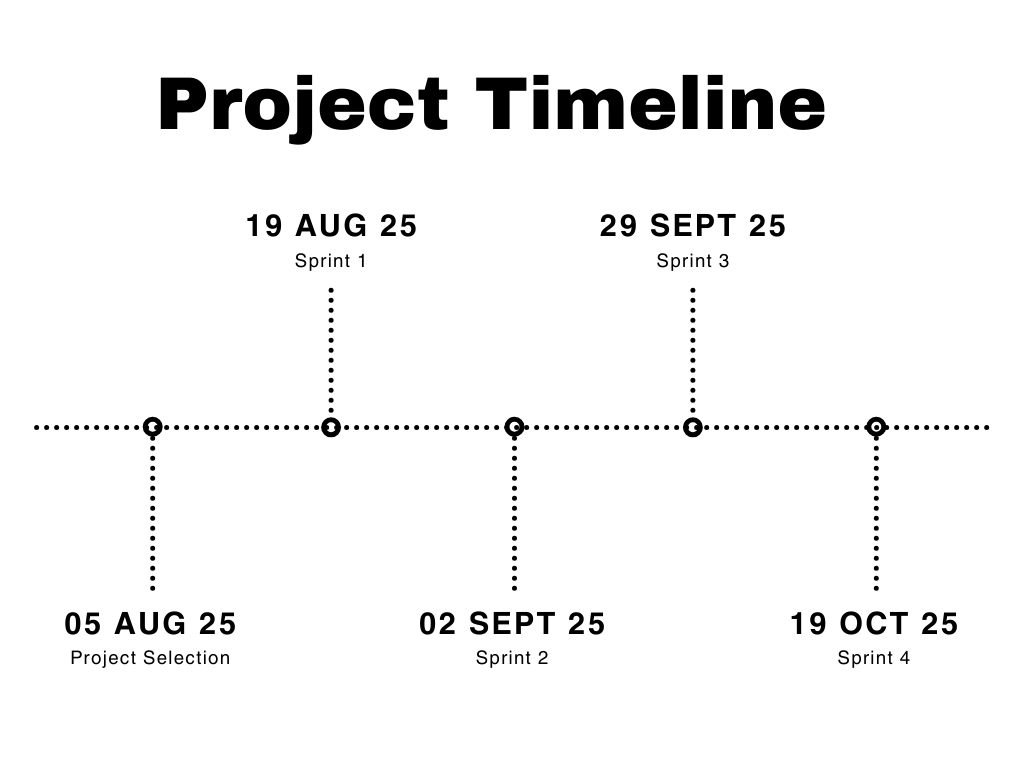
As outlined in our methodology , we operate in a flexible, cross-functional structure. While no specific roles are permanently assigned to deployment, team members contribute as needed to ensure successful and timely releases.
Software / Hardware / Process Cutover Plan
Section titled “Software / Hardware / Process Cutover Plan”The platform was initially deployed on GitHub Pages. However, due to scalability limitations and certain functionality not working as intended, the deployment was migrated to Microsoft Azure.
Future deployments will follow this approach:
- Build – Generate the latest production-ready build of the application.
- Deploy – Push the build to Microsoft Azure.
- Verify – Conduct smoke tests to confirm that the deployment is functional.
- Communicate – Notify stakeholders once deployment is complete.
Software / Hardware / Process Back-out Plan
Section titled “Software / Hardware / Process Back-out Plan”In the event of a failed deployment or critical issues, the following back-out plan will be executed:
- Rollback to the last stable deployment on Azure.
- Restore data and configurations from backups.
- Document the failure, including root cause and corrective actions.
- Communicate the rollback to stakeholders promptly.
In the unlikely event that the Azure back-out plan fails, we will temporarily revert to GitHub Pages until the issue is resolved.
Support
Section titled “Support”The designated deployment lead for each sprint will be responsible for overseeing the deployment. This individual may be required to work additional hours during release windows to ensure system readiness, resolve issues, and coordinate with the team. Support will include:
- Monitoring logs and alerts post-deployment.
- Providing hotfixes where necessary.
- Acting as the point of contact for client queries during release periods.
Training
Section titled “Training”Training Objectives
Section titled “Training Objectives”- Ensure that stakeholders (executives, SGO staff, and users) are able to use the platform effectively.
- Train internal team members on maintaining and updating the system.
Training Participants
Section titled “Training Participants”- CSO Executives
- Users
- Student Governance Office (SGO) staff
- Technical support team
Training Materials
Section titled “Training Materials”- User manuals and quick-start guides
- Video tutorials and live demonstrations
- Frequently asked questions (FAQs)
Resources Required
Section titled “Resources Required”- Training environment (sandbox version of the platform)
- Access to training materials
- Trainers (project team members)
High-Level Schedule
Section titled “High-Level Schedule”Training will take place after the MVP deployment and before full-scale rollout. Sessions will be organized in phases:
- Pilot Training – with a small group of CSO executives.
- Broader Training – extended to all CSOs and SGO staff.
- Ongoing Training – ad-hoc sessions for new users and system updates.