
Git/GitHub Methodology
Git branching methodologies, often referred to as Git workflows or branching strategies, function as roadmaps that teams use to organize work, track different code versions, and collaborate effectively in version control. A consistent naming convention for branches enhances communication and collaboration by providing clarity across the team. The choice of branching strategy depends on the project requirements, complexity, and deployment process (Rau, 2024).
In addition to the branching strategy, the project employs committing strategies to ensure meaningful and descriptive commits, as well as versioning practices to track application versions across sprints and deployments.
Committing Strategy
Section titled “Committing Strategy”The project adopts the Conventional Commits specification, a lightweight convention built on top of commit messages. This specification establishes a structured and consistent approach to commit history, improving readability and ensuring that changes are easily understood by all contributors (Conventional Commits, n.d.; Thompson, 2024).
Commit message format:
<type>[optional scope]: <description>[optional body][optional footer(s)]Commit types used in this project include:
- feat: A new feature
- fix: A bug fix
- docs: Documentation changes
- style: Non-functional style changes (e.g., formatting)
- refactor: Code restructuring without functional changes
- chore: Routine tasks not modifying source or test files
- perf: Performance improvements
- build: Build system or dependency changes
- ci: Continuous integration configuration updates
Example:
feat: add customer lifetime value modelThis strategy was chosen to promote transparency, ensure that all contributors understand each update, and provide a clear record of the progression of features throughout development.
Branching Strategy
Section titled “Branching Strategy”The project used the GitHub Flow workflow due to its simplicity and suitability for small teams requiring rapid iteration and deployment. GitHub Flow facilitates collaboration, safe experimentation, and efficient delivery of features and fixes (W3Schools, 2025). Workflow steps:
- Create a Branch – Begin new work without affecting the main codebase.
- Make Commits – Save progress with descriptive commit messages.
- Open a Pull Request – Submit changes for peer review.
- Review – Collaboratively evaluate and refine code changes.
- Deploy – Test changes in a staging or pre-production environment.
- Merge – Integrate completed work into the main branch.
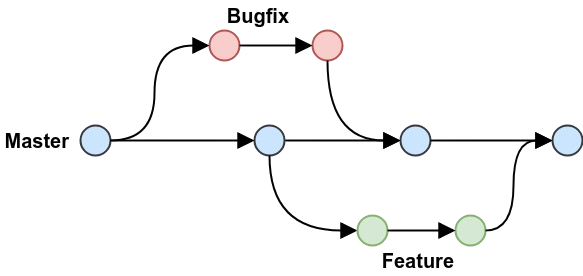
To maintain organization, the project applied a prefix-based branch naming convention:
- feature/: New features or functionalities
- bugfix/: Bug corrections
- hotfix/: Urgent production patches
- design/: UI/UX updates
- refactor/: Code structure improvements without functionality changes
- test/: Automated test additions or updates
- doc/: Documentation changes
Example:
feature/user-authenticationThis approach ensured clarity in development tasks, maintains production readiness, and aligns with the team’s timeline for project delivery.
Versioning
Section titled “Versioning”The project followed Semantic Versioning (SemVer), a widely recognized standard for software release numbering (GeeksforGeeks, 2018). Semantic Versioning supports a standardized process for tracking code changes, simplifies release management, and improves communication with stakeholders by clearly indicating the scope of updates (Amazon Web Services, 2024).
Versioning format:
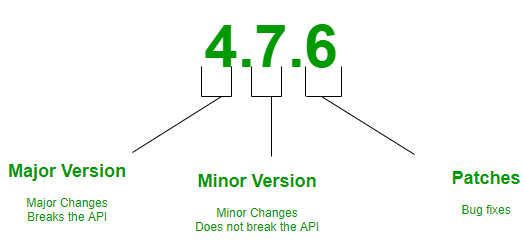
The project began at version 0.1.0, representing the initial feature set. Subsequent versions were incremented with each sprint deployment, such as 0.1.1, 0.1.2, and so forth. This approach ensured consistency, transparency, and alignment with industry standards, while avoiding alternative versioning systems such as calendar-based versioning.